
A shipment is accessible from the "Shipment list" page by clicking on a shipment name or from a project associated to a shipment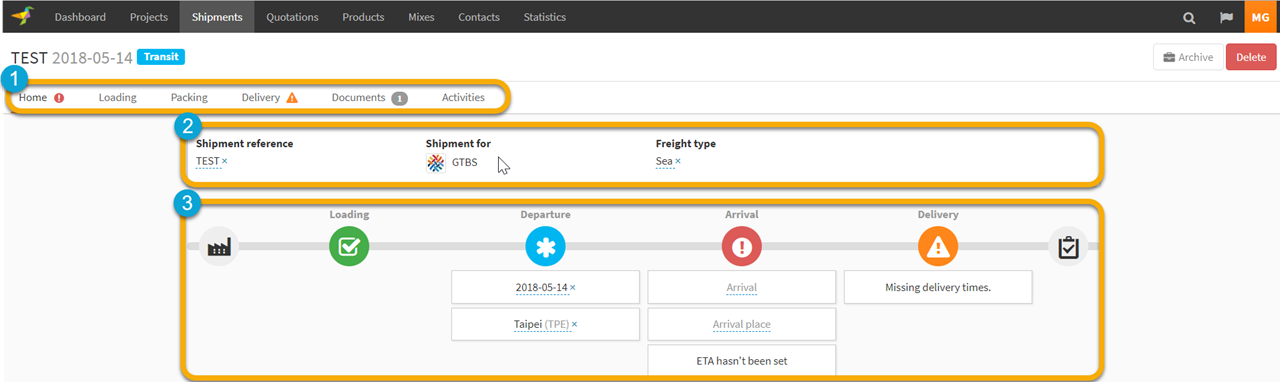
1.The shipment menu allows you to dig into each step of the shipment delivery
2.The shipment header listing the main characteristics of the shipment
3.You can visually see all the status and action to perform for each step of the shipment delivery
Shipment steps statuses
| Loading | Departure | |
 |
- Order line missing on the shipment |
- «Departure place» is missing - «Packing info» is missing - «Required doc» is missing |
 |
Loading is in progress | No data missing and/or step in progress |
 |
Loading step is completed | Departure step is completed |
 |
Issue on Loading has been notified | ETD is missing |
 |
Current Date > Departure Shipment Date | Current Date > ETD |
| Arrival | Delivery | |
|
«Arrival Place» is missing | - Order line missing on the shipment - ETD is passed - Missing Delivery Time |
|
No data missing and/or step in progress | Delivery is in progress |
|
Arrival step is completed | Delivery step is completed |
|
ETA is missing | Issue on Delivery has been notified Delivery Date < Departure Date |
|
Current Date > ETA | Current Date/Time > Delivery Date/Time appointment |
0 Comments